Tinkering with a New Blog: I've Moved My Gcores Talk into the Blog
This article was born from my undying childlike heart.
In April, during a trip, I had a strong urge to write a travelogue, which I first posted on Gcores. As per my usual practice, I would then organize a Markdown version to post on my own blog.
After I finished editing, I found that my blog was broken.
The Old Blog
The trend of building personal blogs became popular in our department during my junior year of college. Seven years ago, this cringe-inducing article described my initial thoughts and feelings when I first set up this blog.
As for the reasons, firstly, I wanted to push myself to write something; secondly, I wanted to do some engineering practice, combining some flashy, latest technologies not taught in school; and having a domain name was really cool, at least I thought so.
Let’s reenact the scene back then:
After learning a tiny bit of something new, with an excited heart, I would hurriedly record my thoughts into a Markdown document.
After writing, I would dashingly execute a few commands to push the new blog post:
$ git add .
$ git commit -m "new blog! hahahaha"
$ git push origin master
Then, eagerly opening the CI interface—CI was still somewhat trendy back then, the DevOps concept had only been proposed a few years prior. On the CI log page, I would wait for the entire blog, including this article, to be built into a static HTML website, wait for Travis to push the build artifacts to the git repository using my key, and wait for Github to publish the build artifacts.
Finally, I would enter my domain https://blog.thrimbda.com and contentedly watch that new article appear at the very top of the page.
Over the years, this process became boring, boring yet consistently effective, until the day it finally failed.
The New Blog
At the end of April, I retried the CI pipeline three times in a row, and all failed. A quick glance at the logs revealed that a certain dependency used for building seemed to have disappeared from the internet due to being too old. I realized what a huge time span seven years is in this industry—long enough for sandstorms to destroy castles and seawater to swallow mountains.
So, during idle moments at work, with some not-so-interesting requirements, I made a technology selection: simple enough, convenient enough.
This new blog was born, and as per tradition, let me introduce it:
As a replacement for the old blog, this new one was complete.
The Childlike Tinkering Process
Perhaps because it was new enough, or because the technology selection was simple enough, or maybe because the feedback loop in frontend work is short enough, coupled with inevitably picking up some frontend knowledge while working with Azheng, filling in the knowledge gaps I didn’t study seriously in my freshman year, the process of tinkering with the blog became fun again.
Some small-scale CSS style modifications, adding a new gitcus, hosting the comment section on Github; I reached an agreement with my seven-years-ago self: coding and tinkering with engineering is indeed a joyful thing, the joy of labor, the joy of play.
I want to ride the tailwind of this joy to focus on (self-indulgently) explaining the technical process of moving my Gcores Talk into the blog.
Data
During a previous exploration, I discovered that Gcores is incredibly friendly to crawlers. Its data interfaces are very uniform and expressive. For example, exploring my Gcores Talk:
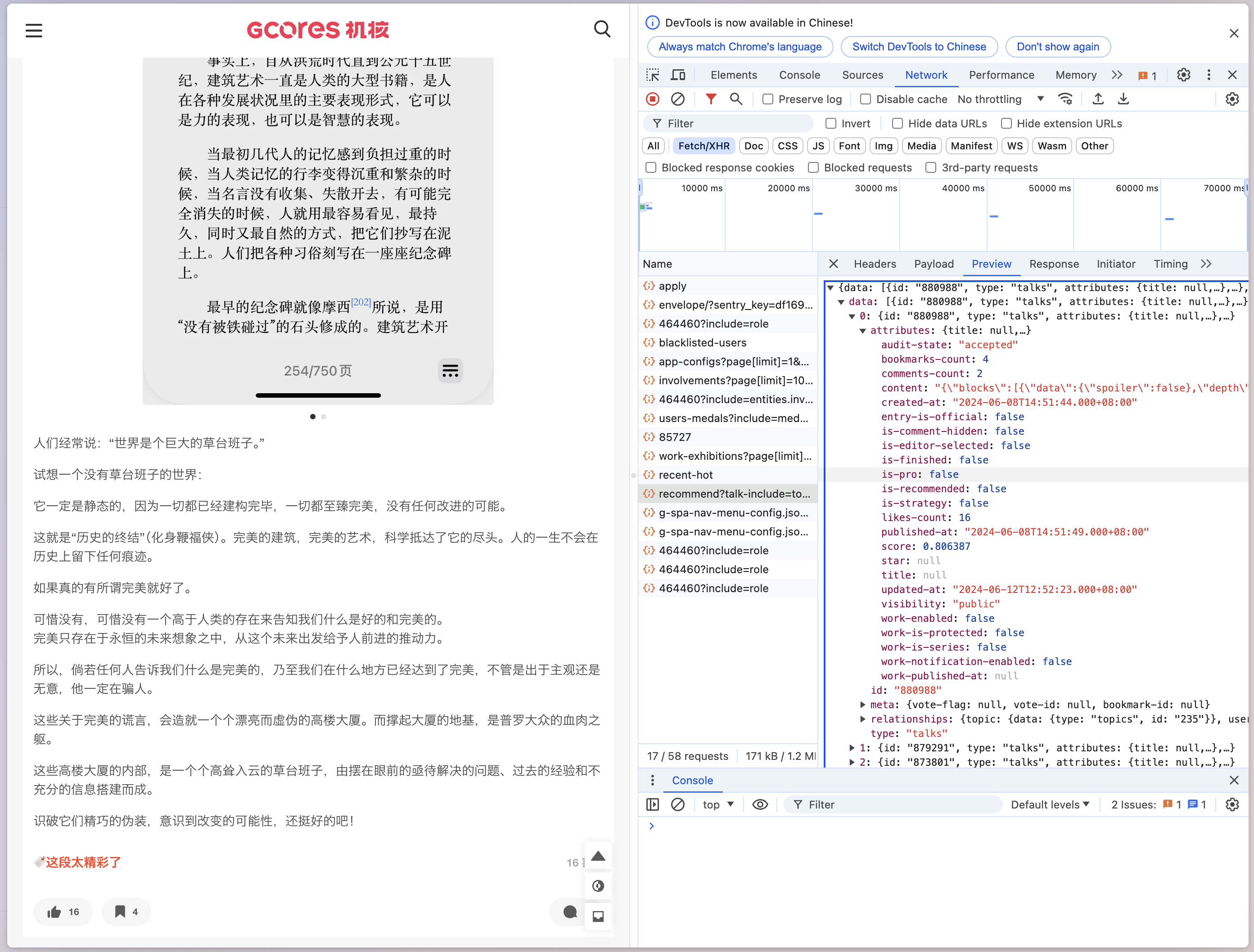
Found that this is the API used to request Gcores Talk data:
https://www.gcores.com/gapi/v1/users/464460/recommend?talk-include=topic%2Cuser%2Chelpful%2Cpoll-options%2Crelated-content.radio%2Crelated-content.video%2Crelated-content.article%2Crelated-content.game%2Crelated-content.film%2Crelated-content.album%2Crelated-content.album-bundle%2Crelated-content.product%2Crelated-content.discussion&original-include=user%2Cdjs%2Ccategory&order-by=time&before=1718720726.986&fields[articles]=title%2Cdesc%2Cexcerpt%2Cis-published%2Cthumb%2Capp-cover%2Ccover%2Ccomments-count%2Clikes-count%2Cbookmarks-count%2Cis-verified%2Cpublished-at%2Coption-is-official%2Coption-is-focus-showcase%2Cduration%2Cdraft%2Caudit-draft%2Cuser%2Ccomments%2Ccategory%2Ctags%2Centries%2Centities%2Csimilarities%2Clatest-collection%2Ccollections%2Coperational-events%2Cportfolios%2Ccatalog-tags&fields[videos]=title%2Cdesc%2Cexcerpt%2Cis-published%2Cthumb%2Capp-cover%2Ccover%2Ccomments-count%2Clikes-count%2Cbookmarks-count%2Cis-verified%2Cpublished-at%2Coption-is-official%2Coption-is-focus-showcase%2Cduration%2Cdraft%2Caudit-draft%2Cuser%2Ccomments%2Ccategory%2Ctags%2Centries%2Centities%2Csimilarities%2Clatest-collection%2Ccollections%2Coperational-events%2Cportfolios%2Ccatalog-tags%2Cmedia%2Cdjs%2Calbums%2Cpublished-albums&fields[radios]=title%2Cdesc%2Cexcerpt%2Cis-published%2Cthumb%2Capp-cover%2Ccover%2Ccomments-count%2Clikes-count%2Cbookmarks-count%2Cis-verified%2Cpublished-at%2Coption-is-official%2Coption-is-focus-showcase%2Cduration%2Cdraft%2Caudit-draft%2Cuser%2Ccomments%2Ccategory%2Ctags%2Centries%2Centities%2Csimilarities%2Clatest-collection%2Ccollections%2Coperational-events%2Cportfolios%2Ccatalog-tags%2Cmedia%2Cdjs%2Clatest-album%2Calbums%2Cis-free%2Cis-require-privilege
Raw Data
Let’s distill the information:
const user = 464460;

const url = new URL(
  `https://www.gcores.com/gapi/v1/users/${user}/recommend?talk-include=topic%2Cuser%2Chelpful%2Cpoll-options%2Crelated-content.radio%2Crelated-content.video%2Crelated-content.article%2Crelated-content.game%2Crelated-content.film%2Crelated-content.album%2Crelated-content.album-bundle%2Crelated-content.product%2Crelated-content.discussion&original-include=user%2Cdjs%2Ccategory&order-by=time&fields[articles]=title%2Cdesc%2Cexcerpt%2Cis-published%2Cthumb%2Capp-cover%2Ccover%2Ccomments-count%2Clikes-count%2Cbookmarks-count%2Cis-verified%2Cpublished-at%2Coption-is-official%2Coption-is-focus-showcase%2Cduration%2Cdraft%2Caudit-draft%2Cuser%2Ccomments%2Ccategory%2Ctags%2Centries%2Centities%2Csimilarities%2Clatest-collection%2Ccollections%2Coperational-events%2Cportfolios%2Ccatalog-tags&fields[videos]=title%2Cdesc%2Cexcerpt%2Cis-published%2Cthumb%2Capp-cover%2Ccover%2Ccomments-count%2Clikes-count%2Cbookmarks-count%2Cis-verified%2Cpublished-at%2Coption-is-official%2Coption-is-focus-showcase%2Cduration%2Cdraft%2Caudit-draft%2Cuser%2Ccomments%2Ccategory%2Ctags%2Centries%2Centities%2Csimilarities%2Clatest-collection%2Ccollections%2Coperational-events%2Cportfolios%2Ccatalog-tags%2Cmedia%2Cdjs%2Calbums%2Cpublished-albums&fields[radios]=title%2Cdesc%2Cexcerpt%2Cis-published%2Cthumb%2Capp-cover%2Ccover%2Ccomments-count%2Clikes-count%2Cbookmarks-count%2Cis-verified%2Cpublished-at%2Coption-is-official%2Coption-is-focus-showcase%2Cduration%2Cdraft%2Caudit-draft%2Cuser%2Ccomments%2Ccategory%2Ctags%2Centries%2Centities%2Csimilarities%2Clatest-collection%2Ccollections%2Coperational-events%2Cportfolios%2Ccatalog-tags%2Cmedia%2Cdjs%2Clatest-album%2Calbums%2Cis-free%2Cis-require-privilege`
);
Further observation reveals that pagination seems to be determined by a parameter called before. By continuously iterating forward with this timestamp parameter until no data is returned, we can write code like this:
import {
  EMPTY,
  Observable,
  expand,
  map,
  mergeAll,
  mergeMap,
  of,
  shareReplay,
  skip,
  takeWhile,
  tap,
  toArray,
} from "https://esm.sh/[email protected]";

const user = 464460;

const url = new URL(
  `https://www.gcores.com/gapi/v1/users/${user}/recommend?talk-include=topic%2Cuser%2Chelpful%2Cpoll-options%2Crelated-content.radio%2Crelated-content.video%2Crelated-content.article%2Crelated-content.game%2Crelated-content.film%2Crelated-content.album%2Crelated-content.album-bundle%2Crelated-content.product%2Crelated-content.discussion&original-include=user%2Cdjs%2Ccategory&order-by=time&fields[articles]=title%2Cdesc%2Cexcerpt%2Cis-published%2Cthumb%2Capp-cover%2Ccover%2Ccomments-count%2Clikes-count%2Cbookmarks-count%2Cis-verified%2Cpublished-at%2Coption-is-official%2Coption-is-focus-showcase%2Cduration%2Cdraft%2Caudit-draft%2Cuser%2Ccomments%2Ccategory%2Ctags%2Centries%2Centities%2Csimilarities%2Clatest-collection%2Ccollections%2Coperational-events%2Cportfolios%2Ccatalog-tags&fields[videos]=title%2Cdesc%2Cexcerpt%2Cis-published%2Cthumb%2Capp-cover%2Ccover%2Ccomments-count%2Clikes-count%2Cbookmarks-count%2Cis-verified%2Cpublished-at%2Coption-is-official%2Coption-is-focus-showcase%2Cduration%2Cdraft%2Caudit-draft%2Cuser%2Ccomments%2Ccategory%2Ctags%2Centries%2Centities%2Csimilarities%2Clatest-collection%2Ccollections%2Coperational-events%2Cportfolios%2Ccatalog-tags%2Cmedia%2Cdjs%2Calbums%2Cpublished-albums&fields[radios]=title%2Cdesc%2Cexcerpt%2Cis-published%2Cthumb%2Capp-cover%2Ccover%2Ccomments-count%2Clikes-count%2Cbookmarks-count%2Cis-verified%2Cpublished-at%2Coption-is-official%2Coption-is-focus-showcase%2Cduration%2Cdraft%2Caudit-draft%2Cuser%2Ccomments%2Ccategory%2Ctags%2Centries%2Centities%2Csimilarities%2Clatest-collection%2Ccollections%2Coperational-events%2Cportfolios%2Ccatalog-tags%2Cmedia%2Cdjs%2Clatest-album%2Calbums%2Cis-free%2Cis-require-privilege`
);

const imageUrl = (image: string) =>
  `https://image.gcores.com/${image}?x-oss-process=image/quality,q_90/format,webp`;

// pagination
url.searchParams.set("before", `${Date.now() / 1000}`);

interface IGcoresTalk {
  text: string;
  images: string[];
  published_at: number;
  tags: string[];
}

const rawGcoresTalkData$: Observable<any[]> = of({
  before: Date.now() / 1000,
}).pipe(
  // raw data
  expand(async ({ before }) => {
    url.searchParams.set("before", `${before}`);
    const res = await fetch(url);
    const data = await res.json();
    if (!data.data || data.data.length === 0) {
      return EMPTY;
    }
    return {
      before:
        new Date(
          data.data[data.data.length - 1].attributes["published-at"]
        ).getTime() / 1000,
      ...data,
    };
  }),
  skip(1),
  // debug
  // take(1),
  takeWhile((v) => !!v.data),
  // filter((v) => v.data.length > 0),
  tap((v) => {
    console.info(v);
  }),
  toArray(),
  shareReplay(1)
);
Now we have an Rx stream carrying all the raw Gcores Talk data for a user.
Processing the Data
With the raw data, the next step is to process it into Markdown. Let’s start processing directly. The key points are:
Decide what content to display.
Understand the Gcores interface fields.
Gcores Talk is similar to a friend circle or Weibo—text with pictures, plus some tags. Let’s display them flatly.
The data for a talk can be defined as follows:
{
  "blocks": [
    {
      "data": { "spoiler": false },
      "depth": 0,
      "entityRanges": [{ "key": 0, "length": 1, "offset": 0 }],
      "inlineStyleRanges": [],
      "key": "7u4tf",
      "text": "-",
      "type": "atomic"
    },
    {
      "data": { "spoiler": false },
      "depth": 0,
      "entityRanges": [],
      "inlineStyleRanges": [],
      "key": "wisz4",
      "text": "核聚变好玩,和雨川西蒙合了影,见到了做志愿者的 merz,然而社恐差点没敢上前搭话,腿快走断了,给没能来的小朋友们买了点纪念品,Celeste 随机异变速通震撼我妈,全程硬是没把因为震惊而张开的大嘴合上。可惜周天广州下雨航班被取消所以急匆匆买了深圳回上海的高铁票就没去成周天的。",
      "type": "unstyled"
    },
    {
      "data": { "spoiler": false },
      "depth": 0,
      "entityRanges": [],
      "inlineStyleRanges": [],
      "key": "nzffe",
      "text": "",
      "type": "unstyled"
    },
    {
      "data": { "spoiler": false },
      "depth": 0,
      "entityRanges": [],
      "inlineStyleRanges": [],
      "key": "7f8m6",
      "text": "下次还来!",
      "type": "unstyled"
    }
  ],
  "entityMap": {
    "0": {
      "data": {
        "caption": "",
        "images": [
          {
            "path": "0ad6514d154c80a9ef6b4b0d6173d132-3024-4032.HEIC",
            "width": 3024,
            "height": 4032
          },
          {
            "path": "69cea053377d3155d5f7e22e8584f289-4032-3024.HEIC",
            "width": 4032,
            "height": 3024
          },
          {
            "path": "aedf102fa319ce3df2438386f894def4-4032-3024.HEIC",
            "width": 4032,
            "height": 3024
          }
        ]
      },
      "mutability": "IMMUTABLE",
      "type": "GALLERY"
    }
  }
}
Combined with the content we want to output, define the following structure:
interface IGcoresTalk {
  text: string;
  images: string[];
  published_at: number;
  tags: string[];
}
What we want to output is simply a string type Markdown text.
const cookedData$ = rawGcoresTalkData$.pipe(
  mergeAll(),
  mergeMap(({ data, included }): IGcoresTalk[] => {
    // we only need the title as the tags of the talk
    const mapTypeIdToTitle = Object.fromEntries(
      included.map((v: any) => [`${v.type}-${v.id}`, v.attributes.title])
    );
    console.info(mapTypeIdToTitle);
    const talks = data
      .filter((v: any) => v.type === "talks")
      .map((v: any) => {
        const content = JSON.parse(v.attributes.content);
        const text = content.blocks
          .filter((v: any) => v.type === "unstyled")
          .map((v: any) => v.text.replace(/\#/, "\\#"))
          .join("\n");

        const images = (content.entityMap?.[0]?.data?.images ?? []).map(
          (v: any) => v.path
        );
        const published_at = new Date(v.attributes["published-at"]).getTime();
        const tags = Object.values(v.relationships as any[])
          .filter((v) => !!v.data)
          .filter((v) => ["topics", "games"].includes(v.data.type))
          .map(({ data }) => mapTypeIdToTitle[`${data.type}-${data.id}`]);
        return {
          text,
          images,
          published_at,
          tags,
        };
      });

    return talks;
  })
);
Now we have a bunch of data structures we want. Next, we just need to process them into string.
cookedData$
.pipe(
//
tap((v) => {
console.info(v);
}),
map((v: IGcoresTalk): string => {
const published_time = new Date(v.published_at);
const title = `## ${published_time.getFullYear()}-${
published_time.getMonth() + 1
}-${published_time.getDate()}`;
const content = v.text;
const images = v.images.map((v) => `})`).join("\n");
const tags = v.tags.map((v) => `- ${v}`).join("\n");
return `${title}\n\n${images}\n\n${content}\n\n${tags}\n`;
}),
toArray(),
map(
(all) =>
`---\ntitle: '0xc1's Gcores Talk Log'\ndate: ${new Date().toISOString()}\n---\nOriginal link: [Thrimbda's Gcores Talk](https://www.gcores.com/users/464460/talks)\n${all.join(
"\n\n---\n---\n\n"
)}`
),
tap((v) => {
console.info(v);
}),
tap((v) => Deno.writeTextFile(`./content/gcores-talks.md`, v))
)
.subscribe();
I chose the most straightforward processing method, directly outputting to a nearby directory.
The complete version of this code is here, run via deno:
deno cache get-gcores-talk.ts
deno run -A get-gcores-talk.ts
Image Display and Rendering
At this point, we have output a valid Markdown, sufficient to render into a decent-looking webpage.
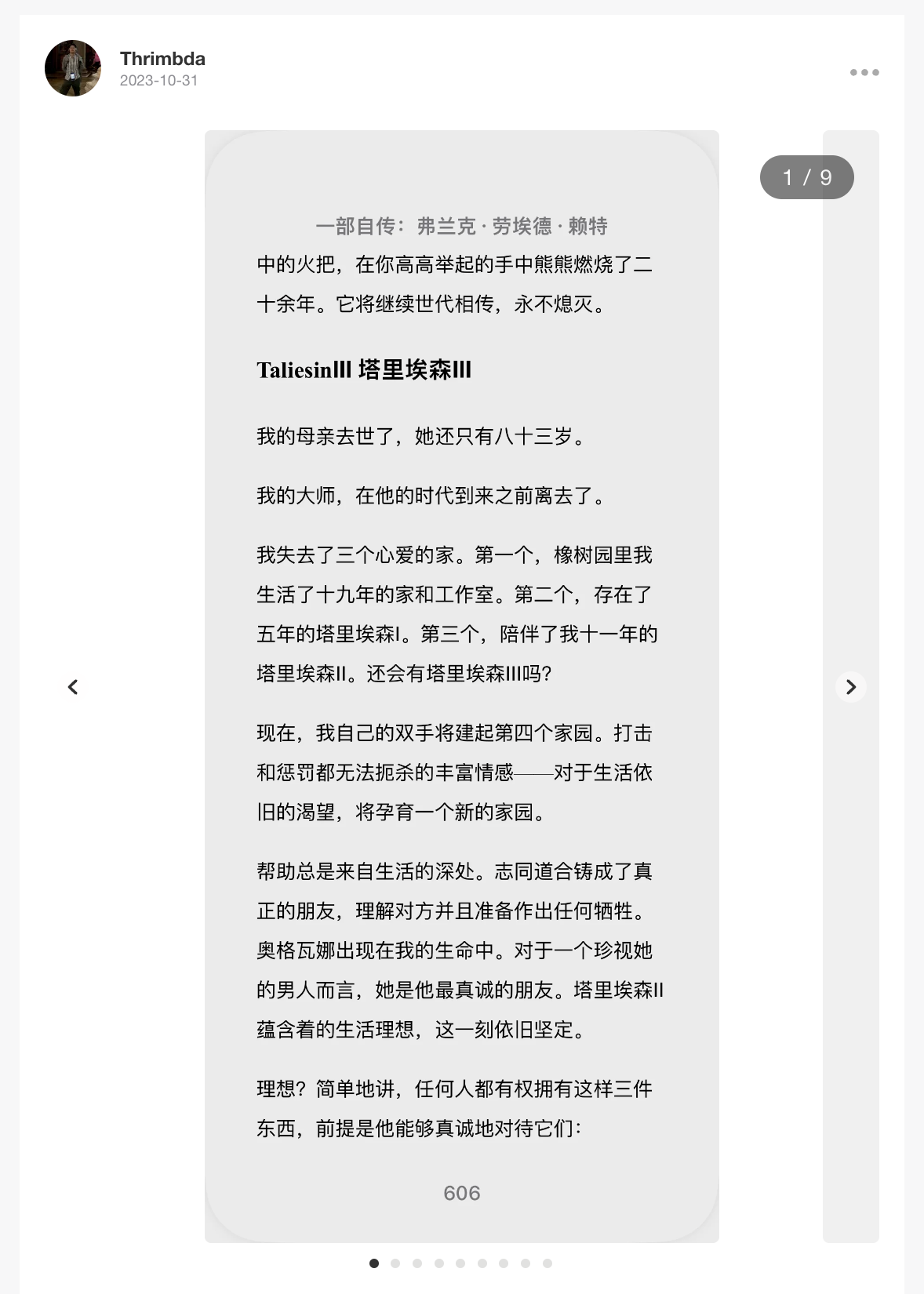
But the images look odd: directly rendering them as flat Markdown stacks makes the proportion of images to text very unbalanced, giving a top-heavy feeling. It would be great if they could be made into a sliding gallery like on Gcores.
Solution Selection
Markdown supports extending its expressiveness through HTML, so we can always render images directly as HTML with our own code to achieve the desired effect. However, Zola provides another way to implement this more easily: Shortcodes | Zola
What we need to do is write an HTML template with appropriate CSS for styling and JS code for interaction; then directly call this HTML in the main Markdown text.
Wait? Writing HTML + CSS + JS, huh, back to freshman year.
Writing the Frontend
HTML
The HTML part is very simple and boring. Provide the following elements for each image gallery:
The container for the sliding gallery itself.
The images.
The dots below indicating the index.
Arrow buttons for switching images left and right.
<div class="slider-container">
<div class="slider-wrapper">
<div class="slider">
{% for slide in slides %}
<div class="slider-item">
<img src="{{slide}}" />
{% if slide.caption %}
<div class="caption">{{slide.caption}}</div>
{% endif %}
</div>
{% endfor %}
</div>
<button class="slider-prev" type="button">❮</button>
<button class="slider-next" type="button">❯</button>
</div>
<!-- The dots/circles -->
<div class="slider-dot-container">
{% for slide in slides %}
<span class="slider-dot"></span>
{% endfor %}
</div>
</div>
CSS
Thanks to more modern frontend technologies, using flex layout to achieve this is very simple now. The core idea is to line up the images in a row, but only reveal the space for one image, with all other images hidden behind it:
.slider-wrapper {
  overflow: hidden;
  position: relative;
  box-sizing: border-box;
  width: 100%;
}

.slider {
  position: relative;
  display: flex;
  box-sizing: border-box;
}

.slider-item {
  position: relative;
  flex: 1 0 100%;
  min-height: 150px;
  max-height: min(550px, 55svh);

  display: flex;
  align-items: center;
  justify-items: center;
  box-sizing: border-box;

  overflow: visible;
}

.slider-item img {
  position: relative;
  width: auto;
  max-height: 100%;
  margin: auto; /* Center horizontally */
}

/* Next & previous buttons */
.slider-prev,
.slider-next {
  /* cursor: pointer; */
  position: absolute;
  /* top: 50%; */
  width: auto;
  height: 100%;
  transform: translateY(-100%);
  font-weight: bold;
  font-size: 1.2rem;

  z-index: 1;
  color: white;
  transition: 0.6s ease;
  border-radius: 5px;
  border: none;
  background-color: transparent;
}

/* Position the "next button" to the right */
.slider-next {
  right: 0;
  border-radius: 5px;
  /* border-radius: 3px 0 0 3px; */
}
.slider-prev:hover:enabled,
.slider-next:hover:enabled {
  border: none;
  color: var(--accent);
  background-color: rgba(71, 71, 71, 0.3);
}

.slider-dot-container {
  text-align: center;
}

.slider-dot {
  cursor: pointer;
  height: 15px;
  width: 15px;
  margin: 0 2px;
  background-color: #bbb;
  border-radius: 50%;
  display: inline-block;
  transition: background-color 0.6s ease;
}
.slider-dot:hover,
.slider-dot-active {
  background-color: #717171;
}
JavaScript
The JS part is responsible for allowing users to switch which specific image is displayed in the visible area through interaction. These interactions include:
Clicking the left/right buttons with the mouse.
Clicking the small dots.
Swiping left/right on touch devices.
After the web API incorporated JQuery, and with the help of rxjs, this becomes quite simple:
const ELS = (selector, parent) =>
  (parent || document).querySelectorAll(selector);
const EL = (selector, parent) => (parent || document).querySelector(selector);
const mod = (n, m) => ((n % m) + m) % m;

ELS(".slider-container").forEach((EL_parent) => {
  const EL_slider = EL(".slider", EL_parent);
  const ELS_items = ELS(".slider-item", EL_parent);
  const ELS_dots = ELS(".slider-dot", EL_parent);
  const total = ELS_items.length;
  let c = 0;

  const setDotActive = () => {
    ELS_dots.forEach((EL_dot, i) => {
      EL_dot.classList.toggle("slider-dot-active", i === c);
    });
  };

  setDotActive();

  const anim = () => {
    EL_slider.style.transform = `translateX(-${c * EL_slider.offsetWidth}px)`;
  };
  const prev = () => {
    distance = 0;
    startX = 0;
    c = mod(c - 1, total);
    setDotActive();
    anim();
  };
  const next = () => {
    distance = 0;
    startX = 0;
    c = mod(c + 1, total);
    setDotActive();
    anim();
  };

  EL(".slider-prev", EL_parent).addEventListener("click", prev);
  EL(".slider-next", EL_parent).addEventListener("click", next);

  ELS(".slider-dot", EL_parent).forEach((dot, i) => {
    dot.addEventListener("click", () => {
      c = i;
      setDotActive();
      anim();
    });
  });

  const touchstart$ = fromEvent(EL_parent, "touchstart");
  const touchend$ = fromEvent(EL_slider, "touchend");
  const touchmove$ = fromEvent(EL_slider, "touchmove");

  touchstart$
    .pipe(
      tap(() => {
        EL_slider.style.transition = "none";
      }),
      switchMap((start) =>
        animationFrames().pipe(
          withLatestFrom(touchmove$),
          map(([, touchEvent]) => {
            const distance =
              touchEvent.touches[0].clientX - start.touches[0].clientX;

            EL_slider.style.transform = `translateX(-${
              c * EL_slider.offsetWidth - distance
            }px)`;
            return distance;
          }),
          takeUntil(touchend$),
          defaultIfEmpty(0),
          last()
        )
      ),
      tap({
        next: (distance) => {
          EL_slider.style.transition = "transform 0.3s ease-in-out";
          if (distance / EL_slider.offsetWidth > 0.2) {
            c = mod(c - 1, total);
          } else if (distance / EL_slider.offsetWidth < -0.2) {
            c = mod(c + 1, total);
          }
          setDotActive();
          anim();
        },
      }),
      repeat()
    )
    .subscribe();
});
The general idea of this entire code is to record a current displayed image index [0, 1, ..., imageNumbers - 1] for each sliding gallery. User interaction changes the index, thereby calculating how many pixels the current sliding gallery should offset to display the image indicated by the index.
I’m quite proud of the last piece of Rx code for touch interaction.
Touch interaction is more complex than button interaction because during the user’s swipe, the images need to follow the user’s finger, and this feel must be tuned well to avoid frustrating the user.
This complexity means the interaction requires more information and more complex WEB APIs.
From an interaction logic perspective, we need to record the pixel position of the finger when the touch starts, and the offset of the finger’s pixel position relative to the initial position at each render frame. Then, during each frame render, we add this offset to the sliding gallery, making the images follow the finger. After moving a certain distance and the finger leaves the screen, we need to decide whether to switch images. For example, if the finger just taps the screen, causing a 2-pixel offset to the right, the image should not switch; but when the finger swipes right across half the screen, the image should switch. Let’s set a threshold of 20% of the offset relative to the entire container. If the finger swipe distance exceeds 20% of the gallery width, we consider it should switch images.
From an API perspective, there are three related events:
touchstart - Indicates the user starts touching the screen. This event carries the initial finger pixel coordinates.
touchmove - Triggered whenever the user’s finger moves, carrying the current finger coordinates.
touchend - Indicates the finger leaves the screen.
Rx is very suitable for implementing this type of requirement. We wrap the user’s finger touch events into a data stream. After processing, it becomes a stream of horizontal finger offsets, used to update the image position in each animation frame. Finally, after the touch ends, decide whether to switch images based on the ratio of the offset to the container width.
Where Does the Joy Come From?
Work brings joy because our brains love feedback and loops.
Pain comes from incomplete or overly long loops. Writing frontend code is so joyful because its loop is efficient enough. Each time you modify the code, with saving and refreshing, you can directly see the effect of the modification. This allows completing several such feedback loops within minutes, thus bringing joy.
I hope this kind of joy can accompany everyone.
Conclusion
To this day, the content discussed in this article could still be considered progressive for a college student’s blog, but its depth is somewhat shallow relative to my years of work experience, to the point where I often felt embarrassed while writing it.
But regardless, compared to the haphazard copying when I last set up a blog, this time I have complete control over every part of my blog. The tinkering process brought me a very pure and simple joy, and it is precisely this joy that gave me the audacity to finish writing it.